Introduction
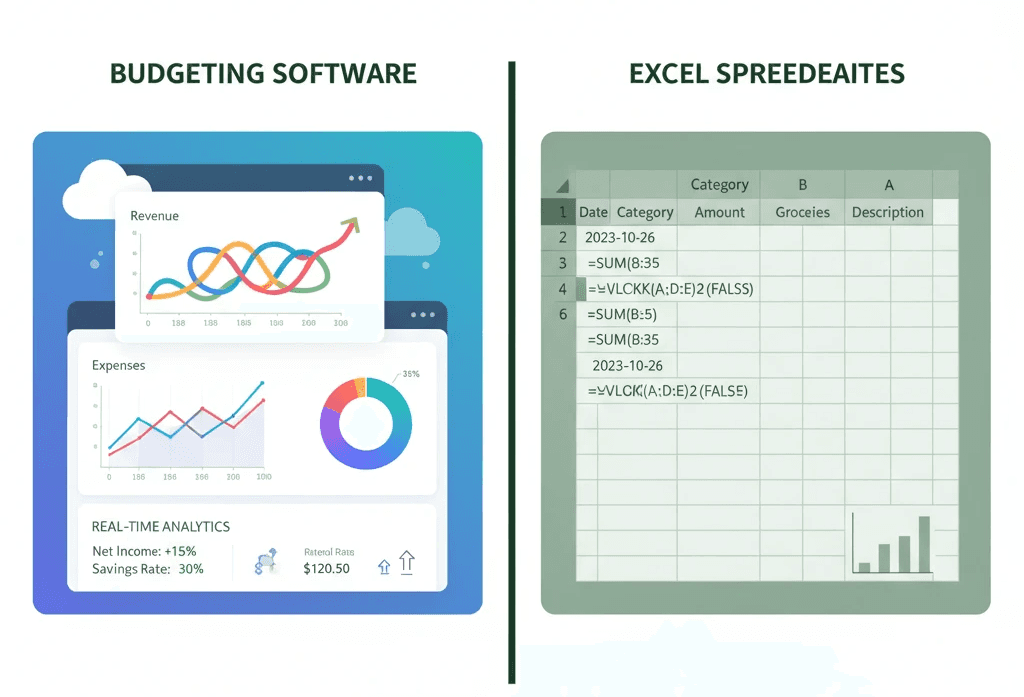
86% of financial professionals still rely on Excel for budgeting and forecasting, despite the availability of automated budgeting software.[1] While Excel remains the default tool for many finance teams, its limitations become increasingly apparent as businesses scale and market conditions demand faster, more accurate insights. Manual spreadsheet-based forecasting consumes valuable time, introduces error risks, and prevents finance professionals from focusing on strategic analysis. This article compares budgeting software to manual Excel forecasting models, examining pricing, accuracy, scalability, and real-time capabilities to help you determine which approach best serves your business in 2026.
BookWell empowers accountants, bookkeepers, and small business owners with AI-driven automation that eliminates manual data entry, reduces errors, and delivers real-time financial insights. With features including automated trial balance preparation, line-by-line transaction categorisation, and ATO Benchmarking, BookWell transforms traditional budgeting workflows into strategic decision-making tools.
Quick Answer
Budgeting software automates data consolidation, reduces manual errors by up to 60%, and provides real-time insights, while Excel forecasting requires manual data entry, version control management, and frequent updates.[2] Automated solutions like BookWell deliver continuous financial visibility, whereas Excel-based models become outdated almost immediately after creation.
Budgeting Software vs Excel: Feature Comparison
Feature | Budgeting Software (BookWell) | Manual Excel Forecasting |
|---|---|---|
Data Entry | Automated via bank feeds and OCR[3] | Manual entry required |
Error Rate | Minimal (AI-validated)[3] | 60% report critical errors[2] |
Real-Time Updates | Continuous syncing | Manual refresh cycles |
Collaboration | Multi-user access with permissions[3] | Version control issues |
Scalability | Handles unlimited transactions | 45% find unmanageable at scale[2] |
Starting Price | $19/month (BookWell)[4] | Free (Excel license required) |
Scenario Modeling | Automated what-if analysis | Manual formula creation |
Audit Trail | Complete transaction history[3] | Limited tracking |
The Excel Forecasting Challenge: Where Manual Models Break Down
Data Scattered Across Multiple Systems
Finance teams pulling data from ERP systems, CRM platforms, and manual inputs face conflicting numbers and spend more time reconciling than analyzing.[5] Without a single source of truth, Excel-based forecasting requires constant cross-referencing between systems, creating bottlenecks that delay decision-making. Manual data consolidation introduces inconsistencies that undermine forecast reliability.
BookWell eliminates data fragmentation by connecting directly with banks and credit card providers, ensuring real-time syncing of financial transactions.[3] This direct integration reduces mistakes, saves time, and guarantees accuracy in bookkeeping records.
Excel Complexity Creates Maintenance Nightmares
When forecasting models become too large or complex, Excel users encounter broken formulas, version control issues, and hidden errors that slow update cycles.[5] Spreadsheets designed for smaller operations struggle under the weight of expanding data sets, multiple scenarios, and cross-departmental collaboration. A single misplaced formula can cascade through an entire model, producing inaccurate forecasts that mislead strategic decisions.
Budgeting software handles larger datasets without performance degradation. BookWell processes large volumes of data simultaneously through batch processing, allowing finance teams to focus on advisory services instead of repetitive entry tasks.[3]
Manual Entry Introduces Critical Errors
60% of finance professionals report that manual data entry in spreadsheet-based forecasting leads to critical errors such as broken formulas or version control issues.[2] Human error remains inevitable when teams manually input hundreds or thousands of transactions. These mistakes compound over time, creating forecasts that diverge significantly from actual performance.
BookWell uses OCR technology to scan receipts, invoices, and bank statements, extracting key data such as vendor names, amounts, dates, and GST details automatically.[3] This automation eliminates the inefficiencies and error risks associated with manual entry.
Static Forecasts Become Outdated Immediately
By the time a quarterly Excel forecast is finalized, assumptions have changed, market conditions have shifted, and the business has moved on.[5] Traditional budgeting cycles produce static documents that fail to reflect current reality. Finance teams spend weeks building forecasts that become obsolete within days, forcing constant manual revisions.
Budgeting software enables rolling forecasts that update regularly with new data. BookWell provides real-time financial insights through dynamic dashboards that display KPIs such as cash flow and expense breakdowns, allowing users to drill down into individual transactions for deeper analysis.[3]
Budgeting Software Advantages: Automation, Accuracy, and Agility
Automated Data Consolidation Saves Time
Budgeting software removes the manual burden of data consolidation, budget updates, and cash flow forecasting, allowing finance teams to redirect their time toward strategic and advisory work.[2] Automated tools pull data directly from source systems, eliminating the need for manual exports, imports, and reconciliation. This efficiency gain translates into hours or days saved per budgeting cycle.
BookWell's AI-driven automation processes receipts, bank statements, and invoices without human intervention, freeing finance professionals to focus on higher-value advisory services.[3]
Real-Time Insights Enable Faster Decisions
Modern businesses need access to accurate data at all times to make smarter decisions.[3] Excel forecasts provide point-in-time snapshots that quickly become outdated, while budgeting software delivers continuous visibility into financial performance. Real-time dashboards surface trends, anomalies, and opportunities as they emerge, enabling proactive management rather than reactive responses.
BookWell uses historical data to forecast future financial performance and compares client data against ATO Benchmarking criteria, highlighting potential risks before they escalate.[3] Alerts notify users instantly about ABN and GST issues, unusual spending activity, and cash flow health.
Scenario Modeling Supports Strategic Planning
80% of finance professionals agree that scenario forecasting offers a much more dynamic approach to financial planning than traditional budgeting.[2] Automated budgeting tools allow businesses to model multiple financial scenarios—optimistic, pessimistic, and base cases—to assess the potential impacts of decisions. This capability helps mitigate risks and capitalise on opportunities that might otherwise be overlooked.
While Excel can support scenario modeling through manual formula creation, budgeting software automates this process and visualises outcomes in real-time, making it easier to communicate scenarios to stakeholders.
Enhanced Compliance and Audit Readiness
Budgeting software maintains comprehensive audit trails that track every action for full transparency and accountability.[3] Excel spreadsheets offer limited tracking capabilities, making it difficult to trace changes, verify assumptions, or demonstrate compliance during audits. Automated systems log all modifications, providing a complete history that satisfies regulatory requirements.
BookWell automatically compiles Business Activity Statements (BAS) and checks invoices against official databases to confirm supplier ABNs and GST registration status.[3] Immediate alerts are triggered for inactive or invalid ABNs, reducing compliance risks.
Pricing Comparison: Excel vs Budgeting Software
Excel: Free but Hidden Costs Add Up
Excel is included with Microsoft 365 subscriptions, making it appear cost-free for budgeting and forecasting. However, the hidden costs of manual Excel forecasting include:
Labor hours: Finance teams spend hours or days on data entry, reconciliation, and manual updates
Error correction: Fixing broken formulas and version control issues consumes additional time
Opportunity cost: Time spent on manual tasks prevents strategic analysis and advisory work
Scalability limitations: Growing businesses eventually require additional tools or custom development
Budgeting Software: Transparent Subscription Pricing
BookWell pricing starts at $19/month with unlimited users, while competitors like QuickBooks Online range from $38-275/month with user limits, and Xero costs $25-90/month with user restrictions.[4] Subscription-based budgeting software offers predictable monthly costs that scale with business needs. Most platforms provide tiered pricing based on features, transaction volume, or user count.
Unlike Excel, budgeting software delivers immediate ROI through time savings, error reduction, and improved decision-making capabilities. BookWell's unlimited document processing and unlimited user access mean practices can grow without adding costs or constraints.[6]
When Excel Still Makes Sense
Small Businesses with Simple Needs
Excel remains viable for very small businesses with minimal transactions, single-user requirements, and straightforward budgeting needs. Sole proprietors or startups with limited financial complexity may find Excel sufficient during early growth stages. However, as transaction volume increases or collaboration becomes necessary, Excel's limitations quickly emerge.
Custom Analysis and Ad-Hoc Reporting
Excel excels at custom analysis, ad-hoc reporting, and exploratory data work that doesn't require automation. Finance professionals often use Excel alongside budgeting software for specialized calculations, one-time analyses, or presentation formatting. The flexibility to create custom formulas and visualizations makes Excel valuable as a supplementary tool rather than a primary forecasting platform.
How to Transition from Excel to Budgeting Software
Step 1: Assess Current Forecasting Processes
Identify pain points in your existing Excel-based forecasting workflow. Document time spent on data entry, reconciliation, and manual updates. Quantify error rates and version control issues. This assessment establishes a baseline for measuring improvement after implementing budgeting software.
Step 2: Define Requirements and Evaluate Solutions
Determine essential features based on your business needs: real-time data syncing, multi-user collaboration, scenario modeling, compliance reporting, or industry-specific capabilities. BookWell offers features specifically designed for accountants, bookkeepers, and small business owners in Australia, including ABN and GST alerts, ATO Benchmarking insights, and BAS generation.[3]
Step 3: Implement with Parallel Testing
Run budgeting software alongside Excel during an initial transition period. Compare outputs to verify accuracy and build confidence in automated processes. BookWell connects directly with banks and credit card providers for real-time syncing, ensuring data accuracy from day one.[3]
Step 4: Train Team Members and Establish Workflows
Provide training on new budgeting software features and establish standardized workflows. Define roles, permissions, and approval processes. BookWell offers unlimited user seats, allowing entire teams to access the platform without additional costs.[4]
Step 5: Monitor Results and Optimize
Track time savings, error reduction, and decision-making improvements after implementing budgeting software. Gather feedback from team members and refine workflows based on actual usage patterns. BookWell's dynamic dashboards provide visibility into financial performance, making it easy to measure the impact of automation.[3]
FAQ
What are the main disadvantages of using Excel for budgeting and forecasting?
Excel forecasting suffers from manual data entry requirements, high error rates (60% report critical errors), version control issues, scalability limitations, and lack of real-time updates.[2] As businesses grow, Excel models become unmanageable, forcing finance teams to spend more time on maintenance than analysis.
How much time can budgeting software save compared to Excel?
Budgeting software eliminates hours or days of manual data entry, reconciliation, and update cycles per budgeting period. BookWell automates data entry through OCR technology and bank feeds, allowing finance professionals to focus on strategic advisory services instead of repetitive tasks.[3]
Is budgeting software more accurate than Excel forecasting?
Yes. Automated budgeting software reduces human error by eliminating manual data entry and providing AI-validated calculations. BookWell uses OCR technology to extract data from receipts and invoices automatically, minimizing the error risks associated with manual entry.[3]
Can budgeting software integrate with existing accounting systems?
Most budgeting software integrates with popular accounting platforms, banks, and credit card providers. BookWell connects directly with financial institutions for real-time syncing of transactions, ensuring data accuracy and eliminating manual imports.[3]
What is the typical ROI timeline for budgeting software?
Businesses typically see ROI within 3-6 months through time savings, error reduction, and improved decision-making. BookWell's pricing starts at $19/month with unlimited users, making it cost-effective for practices of all sizes.[4]
Conclusion
While 86% of financial professionals continue to rely on Excel for budgeting and forecasting, the limitations of manual spreadsheet-based models become increasingly apparent as businesses scale and market conditions demand agility.[1] Budgeting software delivers automated data consolidation, real-time insights, reduced error rates, and enhanced collaboration capabilities that Excel cannot match.
BookWell empowers accountants, bookkeepers, and small business owners to transition from time-consuming manual forecasting to strategic financial planning. With features including automated trial balance preparation, line-by-line transaction categorisation, ABN and GST alerts, ATO Benchmarking insights, and BAS generation, BookWell provides a comprehensive budgeting solution designed specifically for Australian businesses. By automating repetitive tasks, BookWell saves time, reduces costs, and improves financial accuracy—allowing professionals to focus on higher-value advisory services.
Ready to transform your budgeting process? Start a free trial of BookWell and experience the difference automated budgeting software makes.